Building a Family Budget App That Fits Real Life
I didn’t start this project with a grand product idea. I had a spreadsheet, a list of monthly expenses, and the familiar problem of trying to work out what was due, who was paying for it, and what would be left afterwards.
The spreadsheet did its job until it became something we had to keep explaining to each other. I wanted the same numbers in one place, available on a phone, with a clearer view of the month ahead. That became Family Budget.

Start with the way the money actually moves
The first useful decision was to keep the monthly plan understandable. Each month has income for each person and a list of expenses and savings contributions. The app calculates the planned balance separately, so savings aren’t quietly mixed into spending and a negative month is visible instead of hidden in a single household total.
That sounds obvious, but it matters. A budget is only useful if its categories match the decisions a family is making. Money put aside isn’t the same as money spent, and the balance in a bank account isn’t the same as the amount left in this month’s plan.
I also didn’t want a fresh month to mean starting from a blank page. A new month can be created from the last one, carrying the familiar rows forward while leaving the amounts editable. The monthly history stays available, and a family admin can remove selected months when they need to tidy up records.
Make the next bill hard to miss
Some costs happen once; others come around every month. Family Budget keeps those separate. One-off expenses can have a date and a person responsible. Recurring bills have a due day, repeat until removed, and can be marked paid. Where a recurring bill matches a monthly budget item by title, the app uses the amount from that month rather than asking us to maintain two copies of the same number.
The Overview also looks ahead across the next month of salary dates and bills. It walks through the expected ins and outs from the current bank-account balances, then shows the lowest projected balance. That’s more useful to me than a monthly total on its own: timing matters when one salary arrives in the middle of the month and another arrives later.
The reminders are deliberately practical. If browser notifications are enabled, an unpaid recurring bill can trigger a reminder up to three days before its due date and again on the day. Mark it paid and it stops being treated as outstanding.
Keep the business ledger separate
I also put money into Wagah (Pvt) Ltd, and I wanted to track those contributions without muddying the household budget. So the app has a separate Wagah tab for investments and money returned, with a date, payer, optional note, and optional Sri Lankan rupee amount.
When I record an investment, I can choose to add it to that month’s expenses as well. The entry remains visible in the Wagah history, while the linked monthly expense makes its effect on the household plan clear. A money-back entry stays in the business ledger rather than being treated as a household expense in reverse.
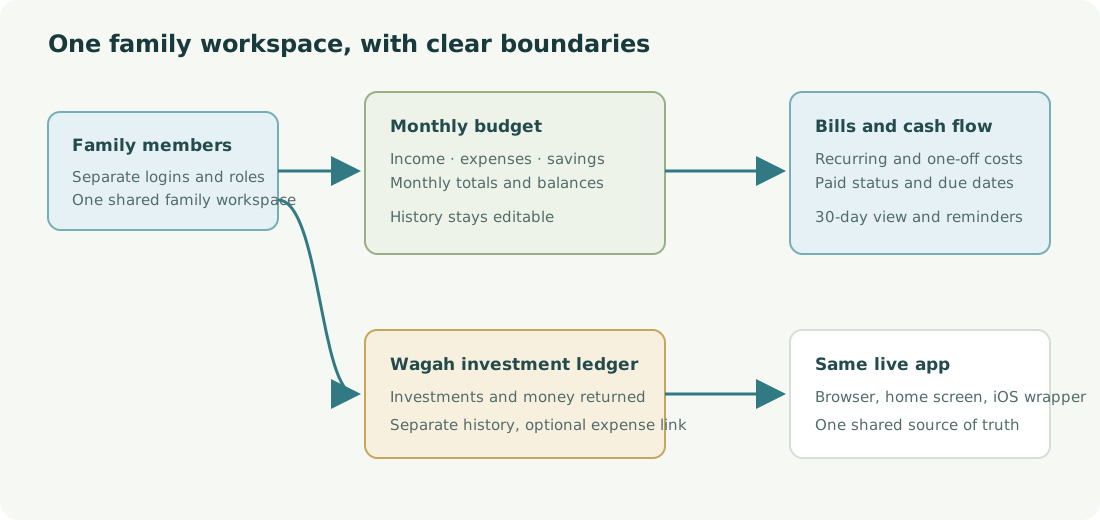
A phone-first app, without a second set of data
The app is a small Node and Express service with a browser-based interface. It runs as a progressive web app, so it can be opened in Safari and added to an iPhone’s home screen. I also made a simple native iOS wrapper in SwiftUI. It loads the same live site; it isn’t a second app with a separate copy of the budget to keep in sync.

That choice kept the first version manageable. The web app is the source of truth, and changes made from a phone or browser go to the same family data. The iOS wrapper mainly gives it an app-shaped home on the phone.
Sharing without sharing one password
One household login stops being convenient as soon as another person needs access. Family Budget now has separate usernames, family workspaces and roles. A family admin can add members, choose whether they are admins or members, and manage the family’s monthly records. The app owner can create and manage separate family spaces and their user limits.
Passwords are stored as salted scrypt hashes, not as readable text. Each family reads and updates its own budget data. Google sign-in is available for accounts that have linked a Google identity. CAPTCHA protection is supported when the Cloudflare Turnstile keys are configured; it is not something I can claim is enabled for every deployment by default.
What I learned
The hard part wasn’t adding another total to the screen. It was deciding which numbers belong together and which should stay separate. Savings, current-account balances, planned expenses and business contributions all affect a family’s decisions, but combining them into one number makes the app less honest, not more useful.
It is still a small, purpose-built app. That’s part of the point. I wanted something that fit the way we already budgeted, then made the next decision a little easier.