Catch Expiring TLS Certificates Before They Take You Down, With Python
Few outages are as annoying as an expired TLS certificate. Nothing is actually broken. The servers are up, the code is fine, and yet every visitor gets a scary browser warning because a date quietly passed and nobody noticed. It happens to big companies more often than you’d think, and it’s almost always because the renewal sat in someone’s head instead of in a system.
The fix is to stop trusting memory. You want something that checks your certificates on a schedule and shouts before they expire, not after. So I wrote a small Python tool that does exactly that, and it’s short enough to read in one sitting.
What I like about this one is that it has no dependencies. It uses only the Python standard library, so it runs on any machine or CI runner with Python installed and nothing to pip install. For a security check that you want to be boringly reliable, fewer moving parts is the whole point.
What it needs to do
The job is simple to describe:
- Take a list of hostnames.
- For each one, connect over TLS and read the certificate’s expiry date.
- Work out how many days are left.
- Print a clear report, and exit with an error code if any certificate is closer to expiry than a threshold I set.
That last point is the one that makes it useful in DevOps. An error exit code is the language pipelines speak. If the script exits non-zero, the pipeline step goes red, and red things get looked at. That turns “I hope someone remembers” into a check that runs on its own.
The certificate’s expiry lives in the handshake
You don’t need any special API to read a certificate’s expiry. When your machine makes an HTTPS connection, the server hands over its certificate during the TLS handshake, and that certificate already contains the expiry date in a field called notAfter. Python’s built-in ssl module gives it to you directly.
OpenSSL formats that date like Jun 24 12:00:00 2026 GMT, so the only fiddly part is parsing it into a real date you can do maths on.
The script
Here it is in full. Save it as certcheck.py.
#!/usr/bin/env python3
"""certcheck - report how many days until a TLS certificate expires."""
import argparse
import socket
import ssl
import sys
from datetime import datetime, timezone

# OpenSSL prints notAfter like: 'Jun 24 12:00:00 2026 GMT'
CERT_DATE_FORMAT = "%b %d %H:%M:%S %Y %Z"


def get_expiry(host, port=443, timeout=10):
    """Open a TLS connection and return the certificate's expiry (UTC)."""
    context = ssl.create_default_context()
    with socket.create_connection((host, port), timeout=timeout) as sock:
        with context.wrap_socket(sock, server_hostname=host) as tls:
            not_after = tls.getpeercert()["notAfter"]
    expiry = datetime.strptime(not_after, CERT_DATE_FORMAT)
    return expiry.replace(tzinfo=timezone.utc)


def days_left(expiry):
    return (expiry - datetime.now(timezone.utc)).days


def main():
    parser = argparse.ArgumentParser(description="Check TLS certificate expiry.")
    parser.add_argument("hosts", nargs="*", help="hostnames, e.g. example.com")
    parser.add_argument("-f", "--file", help="file with one hostname per line")
    parser.add_argument("-w", "--warn", type=int, default=30, help="warn threshold in days")
    args = parser.parse_args()

    hosts = list(args.hosts)
    if args.file:
        with open(args.file) as fh:
            hosts += [line.strip() for line in fh if line.strip() and not line.startswith("#")]

    if not hosts:
        parser.error("no hosts given (pass them as arguments or with --file)")

    failed = False
    for host in hosts:
        try:
            expiry = get_expiry(host)
            left = days_left(expiry)
            status = "OK" if left > args.warn else "WARN"
            if left <= args.warn:
                failed = True
            print(f"{status:4}  {host:30}  {left:4} days  (expires {expiry:%Y-%m-%d})")
        except Exception as exc:
            failed = True
            print(f"FAIL  {host:30}  {exc}")

    return 1 if failed else 0


if __name__ == "__main__":
    sys.exit(main())
The whole thing is one connection, one date parse, one subtraction, repeated per host. The try/except matters more than it looks: a host that’s unreachable, or whose certificate is already invalid, counts as a failure too, because that’s also something you want to hear about.
Running it
Pass hosts straight on the command line:
python3 certcheck.py www.shihansuhail.com github.com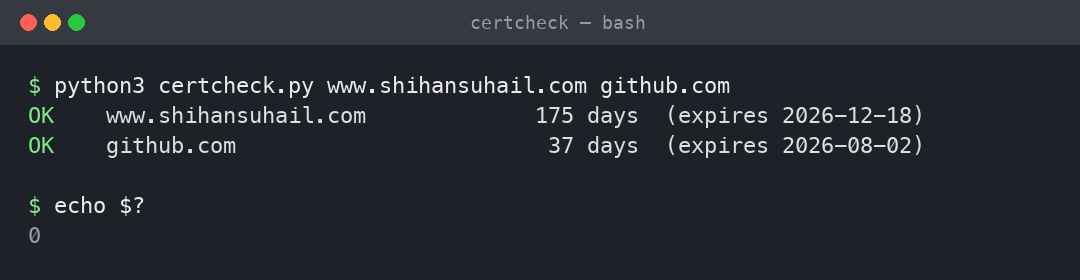
Both fine, so the script exits 0 and a pipeline would stay green.
Now raise the warning threshold to 60 days to see the gate trip:
python3 certcheck.py -w 60 www.shihansuhail.com github.com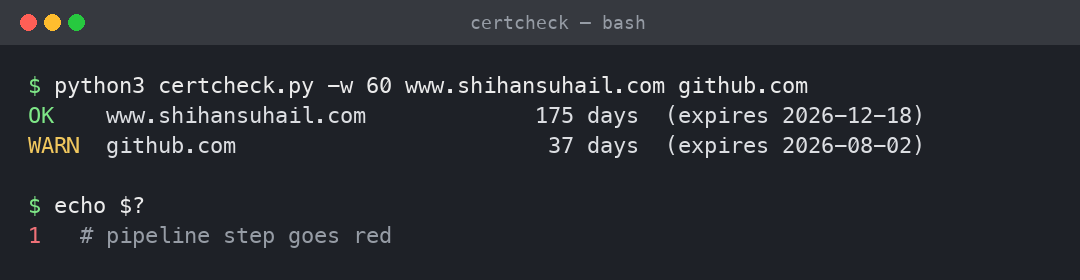
That run exits 1, because GitHub’s certificate sits inside my 60-day window. In a pipeline, that’s the step going red while there’s still a comfortable month to fix it. The exit code is the whole trick. A pipeline doesn’t read your report, it reads the number you exit with.
For real use you don’t want a list of hosts in your shell history. Put them in a file, one per line, with # for comments:
# production endpoints
www.shihansuhail.com
github.com
python3 certcheck.py -f hosts.txtOne honest gotcha on macOS
When I first ran this on my Mac, every host came back as FAIL with CERTIFICATE_VERIFY_FAILED. That isn’t the script being wrong. The Python build from python.org doesn’t wire itself into the macOS system certificate store, so it has no trusted roots to verify against and refuses every connection. It’s a classic first-run surprise.
The fix is to point Python at a certificate bundle:
pip install certifi
export SSL_CERT_FILE=$(python3 -c "import certifi; print(certifi.where())")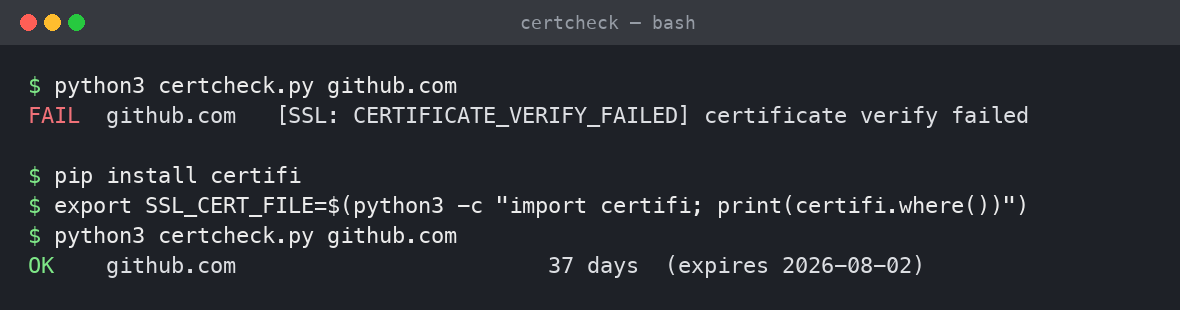
After that the verification passes and the real output shows up. Worth knowing, because the same script on a normal Linux CI runner just works, since those already ship with a system certificate store. I’m flagging it so you don’t lose twenty minutes to it like I nearly did.
Wiring it into a pipeline
A check like this is wasted if you only run it by hand. The point is to let it run on a timer and tell you when something needs attention. A scheduled GitHub Actions workflow does that with no servers to look after:
name: cert-expiry-check
on:
  schedule:
    - cron: "0 7 * * *"   # every day at 07:00 UTC
  workflow_dispatch:

jobs:
  check:
    runs-on: ubuntu-latest
    steps:
      - uses: actions/checkout@v4
      - uses: actions/setup-python@v5
        with:
          python-version: "3.12"
      - name: Check certificates
        run: python3 certcheck.py -f hosts.txt -w 21
Every morning it checks your list. If any certificate drops under 21 days, the job fails, and GitHub emails you the red run. You now find out three weeks early, on a calm Tuesday, instead of from an angry customer on a Saturday night. From a compliance angle this is also tidy evidence that certificate expiry is actively monitored, which is the kind of thing an auditor likes to see proven rather than promised.
Where to take it next
The script is deliberately small so you can grow it for your own setup. A few directions I’ve found worth adding:
If you want to be told rather than having to read a pipeline log, post the WARN and FAIL lines to a Slack or Teams webhook so the alert lands where your team already looks. If you run internal services on non-standard ports, the get_expiry function already takes a port argument, so extending the host file to accept a host:port form is a small change. And if you’d rather have machine-readable output for a dashboard, swapping the print for a line of JSON per host gets you there without touching the logic.
Conclusion
Once a machine is doing the remembering, certificate expiry mostly stops being a problem. Forty lines of standard-library Python, a file of your hostnames, and a daily scheduled run is enough to turn a recurring fire drill into a check you never think about. It costs nothing to run, and it catches the failure while it’s still cheap to fix.
If you end up adapting this for your own stack, let me know how you wired the alerts. I’m always curious how other people glue these things together.